Permissions
Last updated: March 18, 2026
Noibu users can be granted two different levels of permission within the platform, helping ecommerce companies safely extend platform access to non-technical teams such as customer support, marketing, and CX, without exposing sensitive information such as revenue loss, issue volume, or account configuration settings.
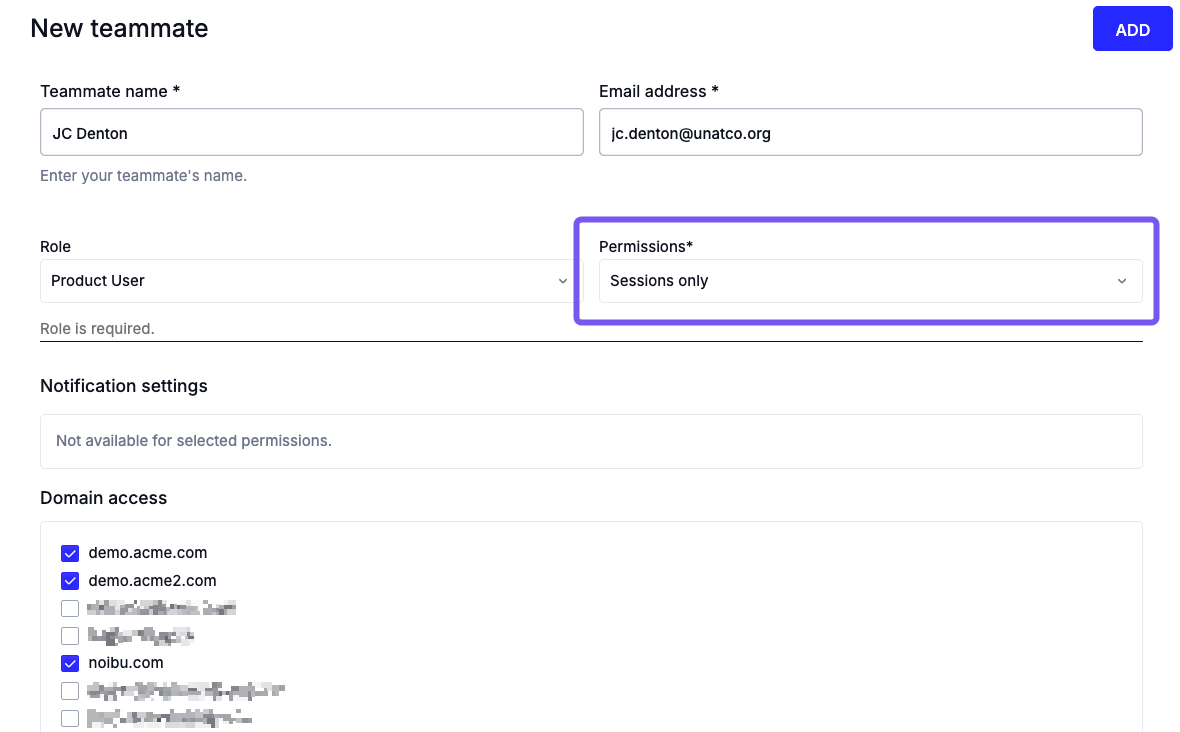
Available permission options for a user include:
- Full Access: Grants full access to all features, including issues, session replay, performance monitoring, and platform configuration.
- Sessions Only: Grants access to the Sessions and Live View pages only, for selected domains. These users can investigate customer sessions, but they cannot access issues, logs, performance data, or platform settings.
|
Users with session-only access will be unable to:
|
Setting and Changing User Permissions
To assign session-only access to a new or existing teammate:
- Go to Settings > Team Management.
- Click Invite Teammate, or choose an existing teammate.
- Under Permissions, select Sessions only.
- Select or deselect the domain(s) this user should have access to.
- Click Add or Save Details
Important: At least one teammate in Noibu must have All Access permissions. If a user is the only one with full access, they cannot change their own permissions to sessions-only until another user has been granted All Access permissions.