Implementing an A/B test
Last updated: October 8, 2026
Overview
An A/B test in Noibu is a feature flag with multiple named variations. Noibu owns the test definition: the title, the variations, the traffic split, the targeting rules, and the success metrics. Your code owns one thing: what each variation renders. The pattern is to read the visitor’s assigned variation, then branch your render code on the result.
Note: This feature is currently in beta. Beta features are still in development as we test and evaluate. They may have limited functionality and can change without notice.
Before you start
Two things must be in place:
The test exists in Noibu. Create it first, so you have the flag key and the generated code snippet. See Creating an A/B test.
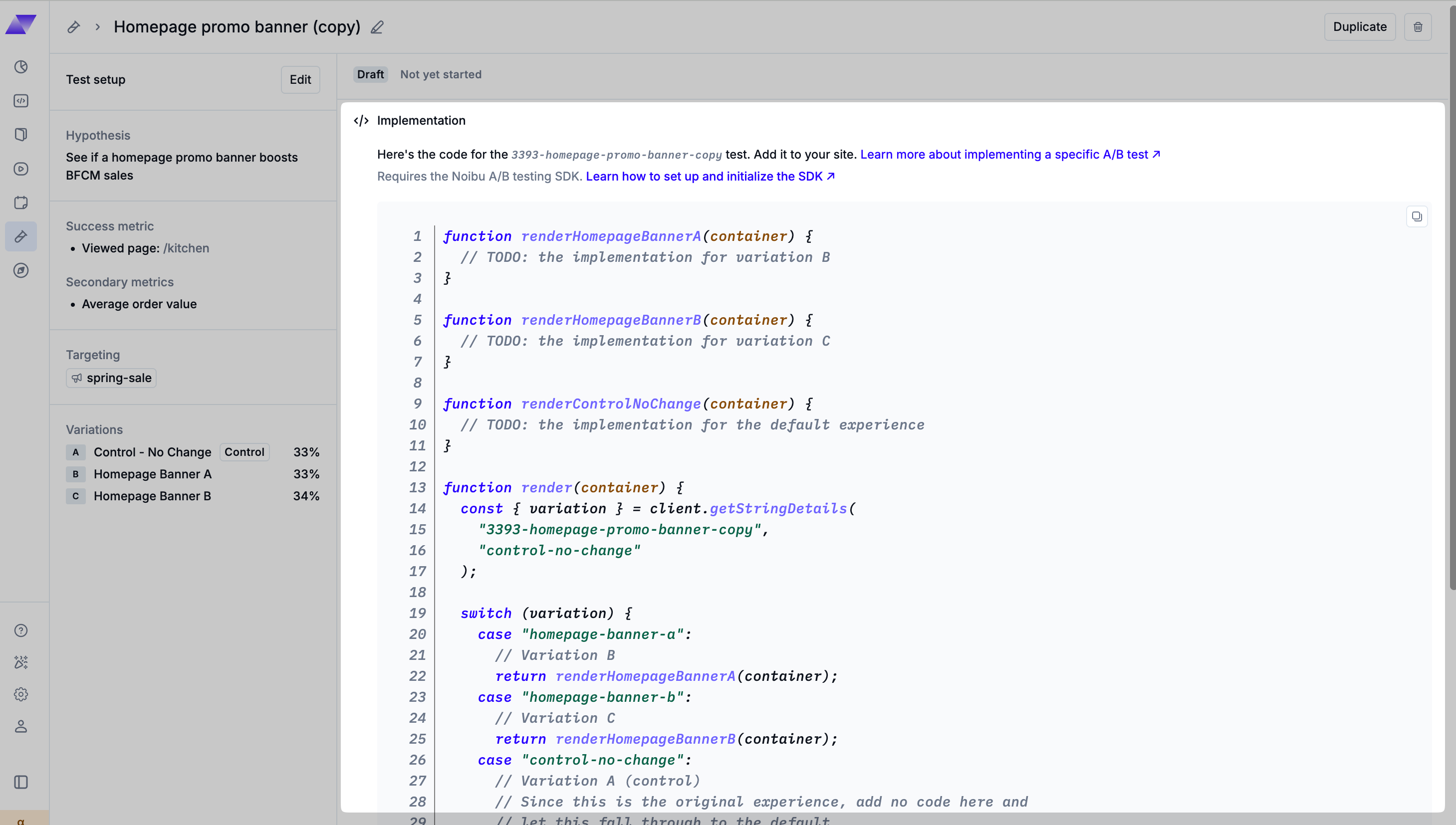
The test’s draft page shows a snippet generated from your setup — copy it into your site as a starting point for the patterns below.
The A/B testing SDK is initialized. See Initializing the A/B testing SDK.
Important: Deploy your variation code to production before the test is started in Noibu. While a test is in the draft state the flag is not active, so no visitor is bucketed. Once the test moves to the running state, Noibu buckets visitors immediately. If your code does not yet handle a variation’s key, that variation quietly shows the same content as the control, because the code falls through to your default case — but Noibu still counts the visitor as part of that variation. This mixes two different experiences under one variation’s results, and you cannot correct the data afterwards.
Core API Reference
const variation = client.getStringValue(flagKey, defaultVariationKey);flagKey: the test's slug from Noibu.defaultVariationKey: the value the SDK returns when it cannot resolve the flag. This happens before the SDK is ready, when the key does not exist, or when the network call fails. Always set this default to the control's key. This way, an unresolved flag fails toward the current experience, not toward a variation.Flag reads are synchronous. They never throw an error.
Each variation resolves to a value equal to its own key. This key is a slug of the variation's name. Because of this, the string that getStringValue returns is the variation identifier you branch on. The method getStringDetails returns the same value, plus a variant field and a reason field. Use this method to find out why a flag resolved the way it did. This is useful for QA. See the QA section below.
Note: Noibu also supports boolean, number, and object flags (getBooleanValue, getNumberValue, getObjectValue). These flag types exist for general feature flagging. A/B tests do not use these types. A test's variations are always string values.
Bucketing Guarantees
Assignment happens at the first evaluation, and it is deterministic. The same targeting key always resolves to the same variation for a given test. Noibu buckets the key by the traffic-split percentage.
If you do not set a custom targeting key, the SDK creates and stores a stable ID in the visitor's browser. Because of this, the same visitor gets the same variation across pages and repeat sessions, as long as that browser storage persists.
A visitor excluded by a test's targeting rules always resolves to the control's value. Your code does not need to handle a separate "excluded" experience.
Copy-Paste Patterns for Common Cases
Every pattern below follows the same shape. Wait for the client. Read the flag. Use switch on the result, with one case for each variation key. Let the control fall through to default.
Vanilla JS or Liquid Theme (Content Swap)
Noibu's generated snippet uses this pattern. It creates a render function for each variation, and each function connects to the flag read.
function onFlagsReady(callback) {
  if (window.NoibuFeatureFlag) {
    var client = window.NoibuFeatureFlag.getClient();
    client.addHandler("PROVIDER_READY", function () {
      callback(client);
    });
  } else {
    window.addEventListener("noibuFeatureFlagReady", function ({ detail }) {
      callback(detail.client);
    });
  }
}

window.addEventListener("noibuFeatureFlagError", function ({ detail }) {
  console.warn("Feature flags unavailable:", detail.message);
  // Continue with the default control experience.
});

function renderStickyCheckoutButton(container) {
  // TODO: variation B implementation
}

function renderCurrentExperience(container) {
  // TODO: this is the current experience. Usually no code is needed here.
}

function render(client, container) {
  const { variant } = client.getStringDetails("cart-drawer-redesign", "current-experience");

  switch (variant) {
    case "sticky-checkout-button":
      // Variation B
      return renderStickyCheckoutButton(container);
    case "current-experience":
      // Variation A, the control. Usually no code is needed here.
      // Let this case fall through to the default.
    default:
      // Visitors excluded by targeting see this. A flag load
      // failure also shows this.
      return renderCurrentExperience(container);
  }
}

onFlagsReady(function (client) {
  render(client, document.getElementById("container"));
});
In a Liquid theme, paste this code in a script tag. Put the tag at the bottom of the section you are testing, and target the section's own container ID.
CSS Class Toggle
For layout or styling changes, add a class instead of swapping markup. This method costs less than a full re-render, and it is easy to control purely in CSS.
onFlagsReady(function (client) {
  var variant = client.getStringValue("pdp-gallery-layout", "current-experience");
  document.documentElement.classList.add("nb-test-pdp-gallery-layout--" + variant);
});
.nb-test-pdp-gallery-layout--grid-2up .product-gallery { /* ... */ }A/B/n Tests (More Than Two Variations)
The pattern stays the same. Add one case for each variation key.
switch (variant) {
  case "variation-b":
    return renderVariationB(container);
  case "variation-c":
    return renderVariationC(container);
  case "current-experience":
  default:
    return renderCurrentExperience(container);
}
Reading Flags Without Flicker
The feature flag bundle loads and resolves asynchronously. Because of this, window.NoibuFeatureFlag may not exist yet at the first paint. You have two options:
Gate the render on assignment. Every example above uses this method. Do not render the tested element until
onFlagsReadyorPROVIDER_READYfires. This method works best when you can defer the tested surface without a performance cost, for example below-the-fold content, a modal, or a drawer.Render the control first, then swap after resolution. Render the control immediately. Re-render only if the resolved variation is different. This method works best for above-the-fold content, where a delay would cause a visible layout shift. The trade-off is a possible flash of the wrong variation for a returning visitor in a non-control arm.
No single option avoids both trade-offs. Choose a method for each surface, based on where the tested element sits on the page.
QA Before Launch
There is no built-in force-variant or preview tool yet. Until this tool exists, use the following methods to test your code:
Read the resolution reason.
client.getStringDetails(key, default)returns{ value, variant, reason }. A reason of"SPLIT"confirms a pseudorandom traffic-split assignment, which means the SDK bucketed you into the test correctly. A reason of"DEFAULT"or"ERROR"means you see the fallback value instead.Sample multiple variations. Test in separate private or incognito windows. You can also clear site storage between page loads. Each new session gets a fresh browser ID and a new, independent assignment.
Set an explicit
targetingKeyduring QA. UseNoibuFeatureFlag.setContext({ targetingKey: "qa-scenario-b" }). This keeps one ID's assignment stable across reloads while you test. This method does not let you choose the variation for that ID. It only stops the assignment from changing during your test.Test on a theme preview or staging domain, if the test's targeting rules or the flag itself target a different domain than your local or development environment. The SDK filters flags by hostname on the client. A test aimed at your production domain does not resolve on
localhost.
Not yet supported: A dedicated force-variant or preview tool does not exist yet. This tool would let you pin a variation with a query parameter, regardless of the bucketing result. If your QA process needs this tool, tell your Noibu contact. This is a known gap, not a workaround you missed.
Test lifecycle
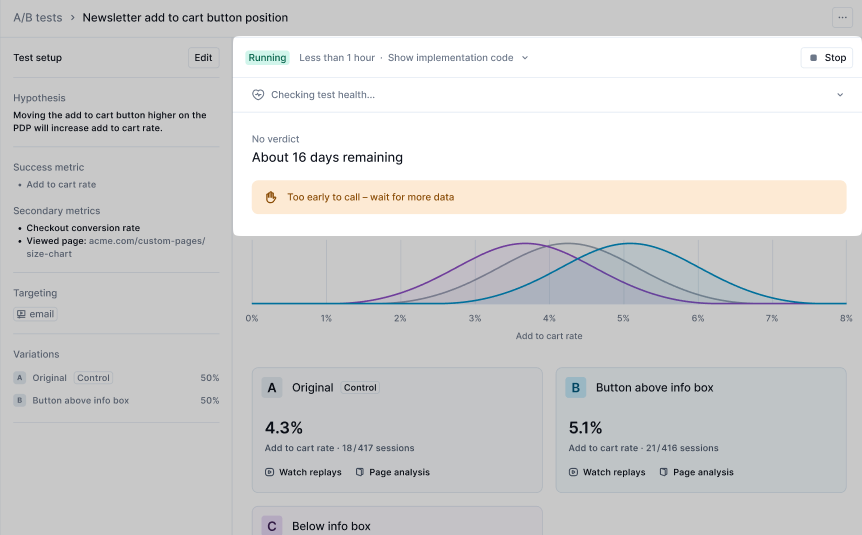
A test moves through three states: Draft, Running, and Stopped. This movement is one-way. You cannot move a stopped test back to running.
Draft: You can edit the entire definition. This includes the variations, the traffic split, the targeting, and the primary metric. Use this state to write and deploy your variation code. Do not move the test to running until your code is live in production.
Running: Only the hypothesis and the secondary metrics stay editable. Noibu freezes the variations, the traffic split, the targeting rules, and the primary success metric. The system enforces this rule on the server, not only in the interface. Plan your variations before you start the test.
Stopped: This state is final. You can delete a test only while it is in the draft state.
What is safe to change mid-test: You can change the hypothesis text and the secondary metrics. Noibu allows this because it does not affect bucketing. Noibu locks everything else because a change would invalidate the results. See Common Mistakes to Avoid below for the reasons.
Ending a test: Stop the test in Noibu after it reaches significance. Noibu does not remove the flag automatically, and it does not roll the winning variation into your default experience automatically. Your team must do this work. After you choose a winner, implement it directly. Delete the switch statement. Ship the winning variation's code as the only path. Then remove the flag read completely. Do not leave a stopped test's branch live in the code.
Common Mistakes to Avoid
Starting a test before your variation code is live. If you move a test to running before you merge and deploy your code, Noibu buckets visitors into variations that do not exist on your site yet. Those visitors fall through to the default case and see the control, but Noibu still counts them as part of the variation. You cannot correct this data after the fact.
Editing variation code while a test is running. Noibu freezes the test definition, but nothing stops you from changing what
renderStickyCheckoutButtondoes in your own codebase during the test. Do not do this. It silently mixes two different experiences under one variation's results.Running overlapping tests on the same element. If two running tests both modify, for example, the cart drawer, the tests will confound each other's results. Neither test's success metric will attribute cleanly to its own variation.
Leaving the default argument pointed at the wrong variation. If your
getStringValuedefault is not the control's key, a flag-load failure serves an arbitrary or empty experience. It does not fail safely toward the current experience.Leaving a stopped test's flag read in the code. After a winner ships, remove the
switchstatement and the flag read. A live read against a stopped test still resolves, to the control, because of the fail-open default. But this code is dead weight, and it is a trap for the next person who assumes the test still runs.
Next steps
Your test is now live in code. Return to Noibu to start the test and monitor the results. See Measuring A/B test results.