A/B testing overview
Last updated: September 15, 2026
A/B testing in Noibu lets you compare two or more versions of a shopping experience with real traffic and see which one performs best. You set up the test in Noibu, your development team implements the variations in code, and Noibu measures the outcome using the conversion, revenue, error, and performance data it already collects.
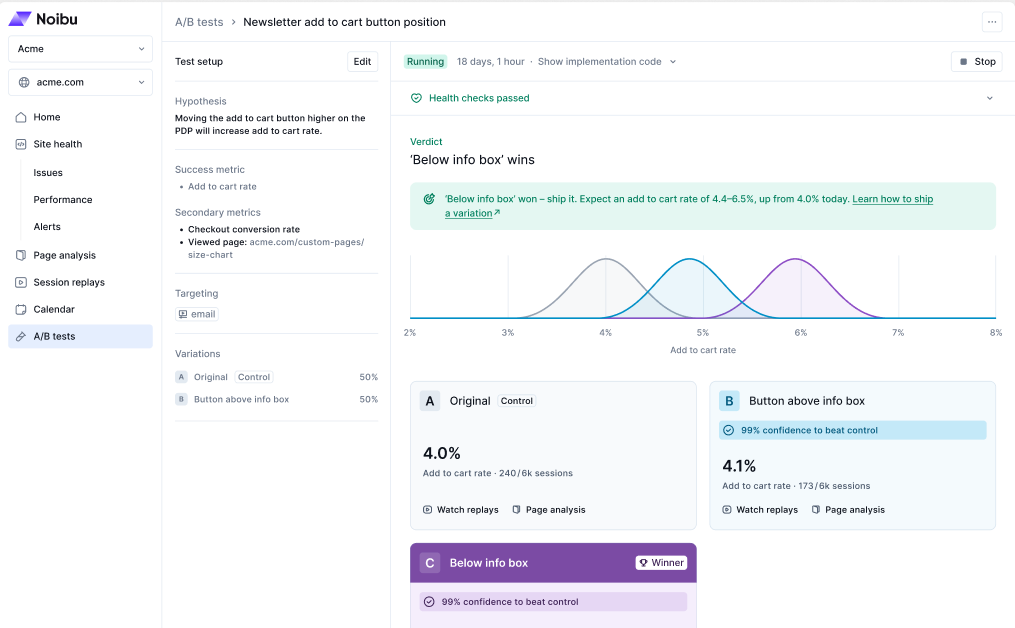
Because Noibu joins test results to its behavioural and technical data, you can see not just which variation won, but why. Every result links to session replays and page analysis for that variation, and automatic health checks tell you whether a result was affected by errors or slow page loads. A/B testing is included with core Noibu at no additional cost.
You can test anything your development team can render in the browser before checkout: page copy, layout, and design; campaign and promotional content; component and journey changes such as a cart drawer redesign; and new front-end features such as a post-purchase widget. Checkout steps can be tested on platforms where your team controls the checkout code, such as Adobe Commerce, Salesforce Commerce Cloud, or a custom or headless build.
Note: This feature is currently in beta. Beta features are still in development as we test and evaluate. They may have limited functionality and can change without notice.
How A/B testing works
A test runs in five stages. Noibu owns the test definition and the measurement. Your development team owns the code for each variation, and decides when to make a winning change permanent.
1. Create the test. From A/B tests in the left navigation, define a title, an optional hypothesis, your success metrics, who the test applies to, and the variations with their traffic split. A test needs at least two variations: the current experience (the control) and one or more challengers, up to four variations in total.
See Creating an A/B test.
2. Implement the variations in code. Noibu generates a JavaScript scaffold from your test setup. Your developer adds it to the site and implements each variation. There is nothing to install: the A/B testing software development kit (SDK) is delivered automatically by the Noibu script already on your site, on any ecommerce platform.
Important: Deploy your variation code to production before you start the test. If you start a test before the code is live, Noibu assigns visitors to variations that do not exist yet. Those visitors see the control but are still counted under the variation, which mixes two experiences under one set of results. You cannot correct that data afterwards.
3. Start the test. Once the variation code is live, click Start on the test page. Eligible visitors are randomly assigned to a variation according to the traffic split, and each visitor sees the same variation consistently across pages and repeat visits. Targeting and variations are locked while a test runs. Visitors outside the target audience always see the control.
4. Read the results. The results page tells you whether a variation won, by how much, and how much confidence to place in that call. It also shows automatic health checks, so you can see whether errors or page speed affected the outcome. Noibu informs the decision and never makes it for you: you can stop a test at any time.
See Measuring A/B test results.
5. Deploy the winning variation. To make a winning change permanent, your development team implements it directly in your site code and removes the test code. Noibu never deploys code to your site, and it does not roll a winning variation into your default experience for you.
Investigating why a variation won or lost
A result tells you what happened. The rest of Noibu tells you why. Because A/B testing uses the same session identifiers as the Noibu script, every session in a test is already joined to the behavioural and technical data Noibu collects, with no extra instrumentation.
From any result you can:
Watch session replays filtered to a single variation, to see how visitors in that arm actually behaved. Noibu records every session with no sampling or quota, so the replays for a small or narrowly targeted variation are all available.
Review page analysis for a variation, including heatmaps, to compare interaction patterns between arms.
Query test data through Noibu’s Model Context Protocol (MCP) server in AI tools such as Claude, to analyze results and segment them further without exporting anything.
For the full detail on health checks and investigation, see Measuring A/B test results.
Best practices
Test one meaningful change at a time. Unrelated changes bundled into one test make the outcome impossible to attribute.
Choose the primary metric closest to the outcome you want to improve, and use secondary metrics to check for side effects rather than to redefine success mid-test.
Let a test reach its verdict before you decide, unless a variation is causing a genuine customer or business risk.
Avoid running two tests on the same page element at once. Overlapping tests confound each other, and neither result attributes cleanly.
Check the health checks before you accept a surprising result. An unexpected loss is worth a second look when an error rate or page speed warning is showing.
Remove the test code once you have shipped a winner. A flag read left against a stopped test resolves to the control, but it misleads the next developer who finds it.