Using Accessibility Audit
Last updated: October 2, 2026
Overview
The Accessibility Audit skill (/accessibility-audit) runs a WCAG 2.1 AA accessibility audit across your highest-traffic pages and produces a report. It uses your Noibu pageview data to identify the pages worth auditing, scans each one for accessibility violations, and compiles the results into a report your developers can work from, ordered so the violations affecting the most shoppers come first.
Where a violation is fixable in code your store owns, the skill can also open a pull request or a ticket for it, and it can run the whole audit on a recurring schedule.
This skill is included as part of the Noibu plugin.
When to use it
Most merchants run an accessibility review on a fixed cadence, annually or twice a year, and this skill is built for that review. It is also useful:
Before a site redesign goes live
After a theme or app change that touched global styles
When you need to scope accessibility remediation clearly enough to hand to a developer or an agency
How to trigger it
Ask “run an accessibility audit on my site”, “check my site for WCAG gaps”, or “where are my accessibility issues?” You can also type /accessibility-audit.
To change the scope, specify a page count — for example, “audit my top 20 pages”. The default is your 10 most-visited pages over the last 30 days.
What you get
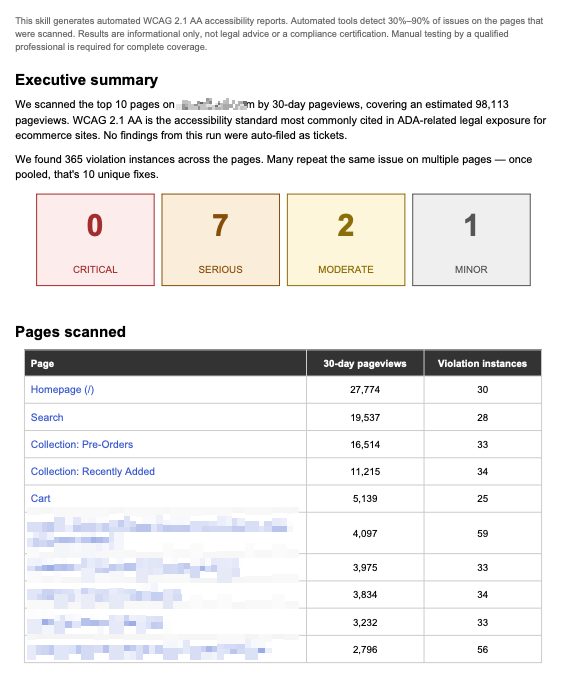
A PDF report named for your domain and the audit date, containing:
An executive summary with the pages scanned, the pageviews covered, the violation instances found, and the number of unique fixes those pool down to
Severity cards showing the count of critical, serious, moderate, and minor findings
A table of the pages scanned, each linked, with its 30-day pageviews and violation instance count
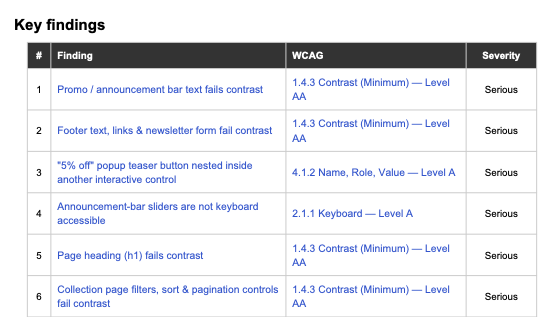
A key findings table listing each finding with its WCAG criterion, linked to the W3C explanation of that criterion, and its severity
A detail section per finding: the pages and pageviews affected, the criterion it fails, a plain-language description, the CSS selector and HTML snippet that locate it in your code, a suggested fix, and every page it appears on
Notice: Accessibility scanning and AI-generated remediation suggestions are automated and may contain errors or omissions.
Automated testing detects only a portion of accessibility issues and cannot establish conformance with WCAG or compliance with any accessibility law or standard.
All findings and all suggested changes must be reviewed by a qualified person before they are relied on or deployed. Full verification requires assessment by a qualified third-party accessibility auditor.
Actioning accessibility findings
After the report is delivered, the skill offers two ways to move the findings into your team's workflow:
Auto-draft PR — writes the code change and opens a pull request for each of the top fixable findings. This needs your GitHub connector active and the repository that holds your theme. If GitHub isn't connected yet, clicking the button walks you through connecting it.
Auto-create tickets — opens a ticket for each of the top fixable findings in your ticket platform. This needs that platform's connector active and the team or project to file into.
Either path covers the top 10 fixable findings by priority. A finding that can't be traced to a specific file becomes a ticket labelled needs-investigation instead, so it still reaches someone rather than being dropped. Each pull request and ticket carries the same detail as the report: severity, pages and pageviews affected, the WCAG criterion, the selector and snippet, and the suggested fix.
Running it on a schedule
The skill can put the audit on a weekly, biweekly, or monthly cadence. A scheduled run scans the same way, applies whichever fix automation you chose, and delivers the report into that scheduled task's own history, where you open it.
You can optionally have a digest sent to email, Slack, or Notion after each run. The digest carries the executive summary and links to whatever pull requests or tickets that run created, and points back to the task in Claude for the full report.