Using A/B Test Opportunity Finder
Last updated: October 9, 2026
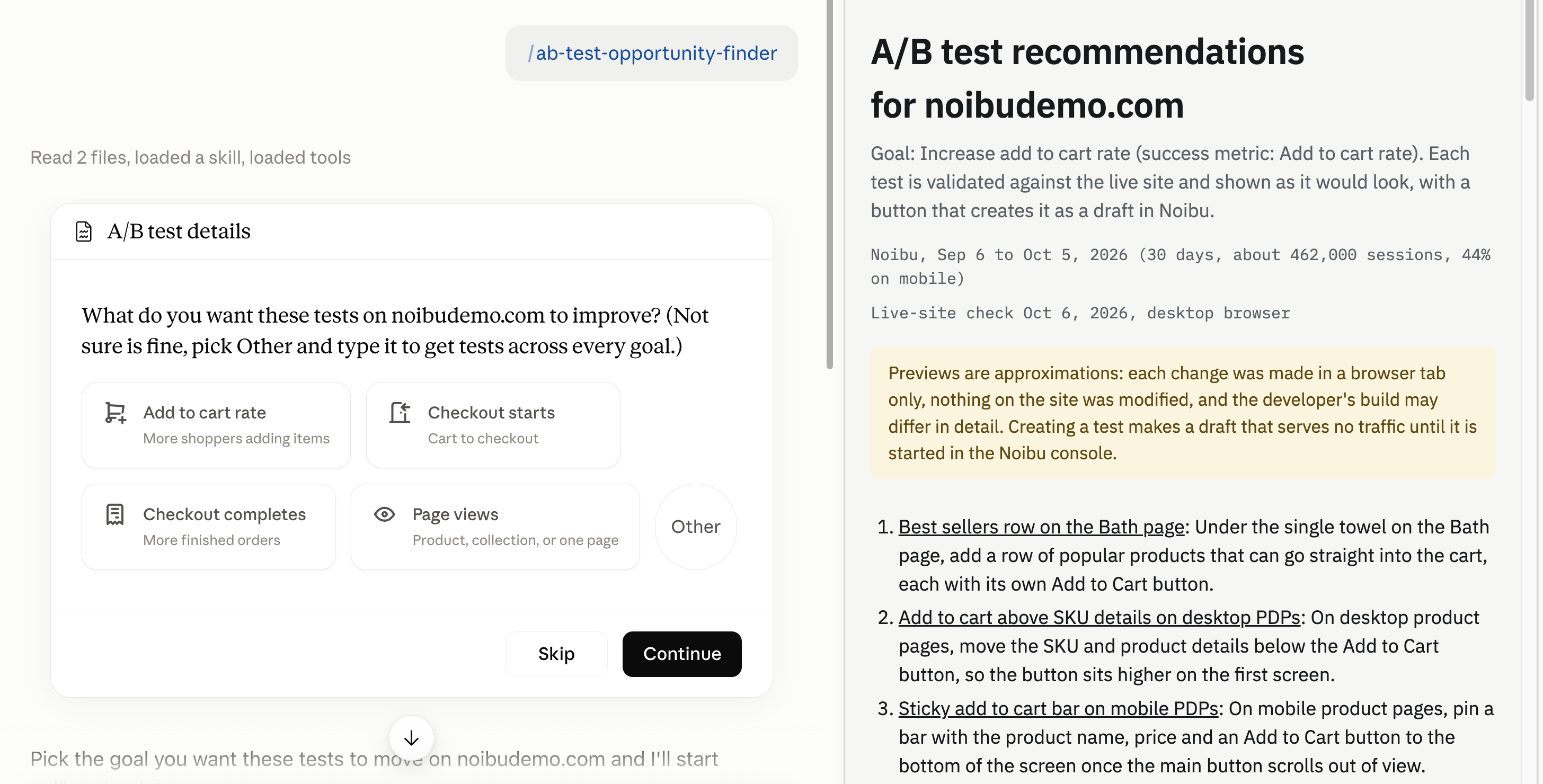
The A/B Test Opportunity Finder skill (/ab-test-opportunity-finder) recommends A/B tests for your store, aimed at the goal you choose. It combines 30 days of your Noibu data with a check of your live site, then publishes a page of ranked tests, each with the evidence behind it, a before-and-after preview, and the setup instructions.
Each test on the page has a Create A/B test in Noibu button that creates it as a draft in your Noibu account. Your developers build the variation, and you start the test when the code is live.
A/B Test Opportunity Finder ships with the Noibu AI plugin, so there is nothing to download or install separately.
When to use it
When you need to decide what to test first in A/B testing
When a metric you care about, such as add to cart rate, has stalled and you want testable ideas rather than a list of best practices
After a peak season or a major campaign, to turn what you learned into tests for the next one
When your testing backlog is built from opinions, and you want each test tied to a measured gap
When you want to see a proposed change on your own site before anyone builds it
How to trigger it
Ask “what should we A/B test?”, “find test ideas to increase add to cart rate”, or “where are we losing conversions that a test could fix?” You can also type /ab-test-opportunity-finder.
Before it pulls any data, the skill asks what you want the tests to improve:
Increase add to cart rate
Increase checkout starts
Increase checkout completes
Increase page views, on product pages, collection pages, or one specific page
If you are not sure, say so. You get tests across every goal instead. If your question already names a goal, such as “get more shoppers into checkout”, the skill uses it and does not ask.
What you need
To run this skill you need Claude, with the Claude extension for Chrome. The skill uses the browser to check your live site and capture the before-and-after previews. If the browser is not available, the skill still runs on your Noibu data, but statements about your site are inferred rather than observed and previews are unavailable.
Note: If you have built your business context with /build-business-context, the skill uses it to write hypotheses and variation names in your brand’s voice. If you have not, the skill still runs and suggests building it.
How it works
Readiness check
Before running the full analysis, the skill confirms your domain has enough data to test against. If the domain is not receiving data, or has very little traffic in the window, the skill stops and tells you. If a related domain carries the traffic instead, such as a separate checkout domain, it names that domain and offers to run against it.
If your domain does not record add-to-cart or checkout events (see Ecommerce Event Data), the skill cannot measure add to cart or checkout goals there. It offers to switch to page-view goals, and the page notes that the events need to be set up before any cart or checkout test.
The data
The skill reads the last 30 full days of your Noibu data, but for lower-traffic stores it reads 90 days so the numbers are reliable. It looks at conversion and funnel progression by device, how far shoppers scroll on your top pages, what they click on your top collection page and your cart, where shoppers who added to cart leave, and which traffic sources land on pages that get visits but few add-to-carts.
An idea becomes a candidate only when the data shows a measured gap. Examples are one segment converting well below another, or a page performing below other pages of the same type. The gap must sit on meaningful traffic and act on the goal you chose. General best practice without a gap behind it does not qualify.
The site check
While the data loads, the skill visits your live site in the browser. It always reads your homepage and your shipping and returns policies. It then reads the pages your goal depends on, chosen from your data rather than a fixed route: your most-visited collection and product pages for add to cart and page-view goals, and a product page and your cart for checkout goals. For the checkout completes goal, it also observes the first checkout step.
The site check exists to remove ideas for changes your site already has, such as recommending quick add on product cards your collection pages already show. Where something on the site is broken rather than worth testing, the skill flags it with a Fix first note, because it would distort the test's result.
Note: The browser views your site at desktop size. Anything it says about mobile behaviour comes from your Noibu scroll and click data.
Ranking
The remaining ideas are ranked by the strength of the evidence, the traffic each change would reach, and the plausible size of the effect. A typical page carries three to six tests. If only two ideas clear the bar, you get two, and the skill tells you why.
Every test uses the success metric for the goal you chose. A strong idea that moves a different metric is listed separately, as one line under Outside your goal.
What you get
A Recommended tests page, published in Claude. It opens with a one-line summary of each test, then gives each test its own section:
What to change, in one or two sentences
Why this test, the measured problem and what the site check found, with no more than three numbers. Evidence from a self-selected group, such as shoppers arriving from email, is labelled as correlational: it justifies running the test, not assuming the result.
Before and after, a capture of your current page next to the same page with the variation applied
Set it up in Noibu, the test’s Title, Hypothesis, Success metric, Secondary metrics, Targeting, and Variations, in the same order and with the same names as the Create A/B test screen
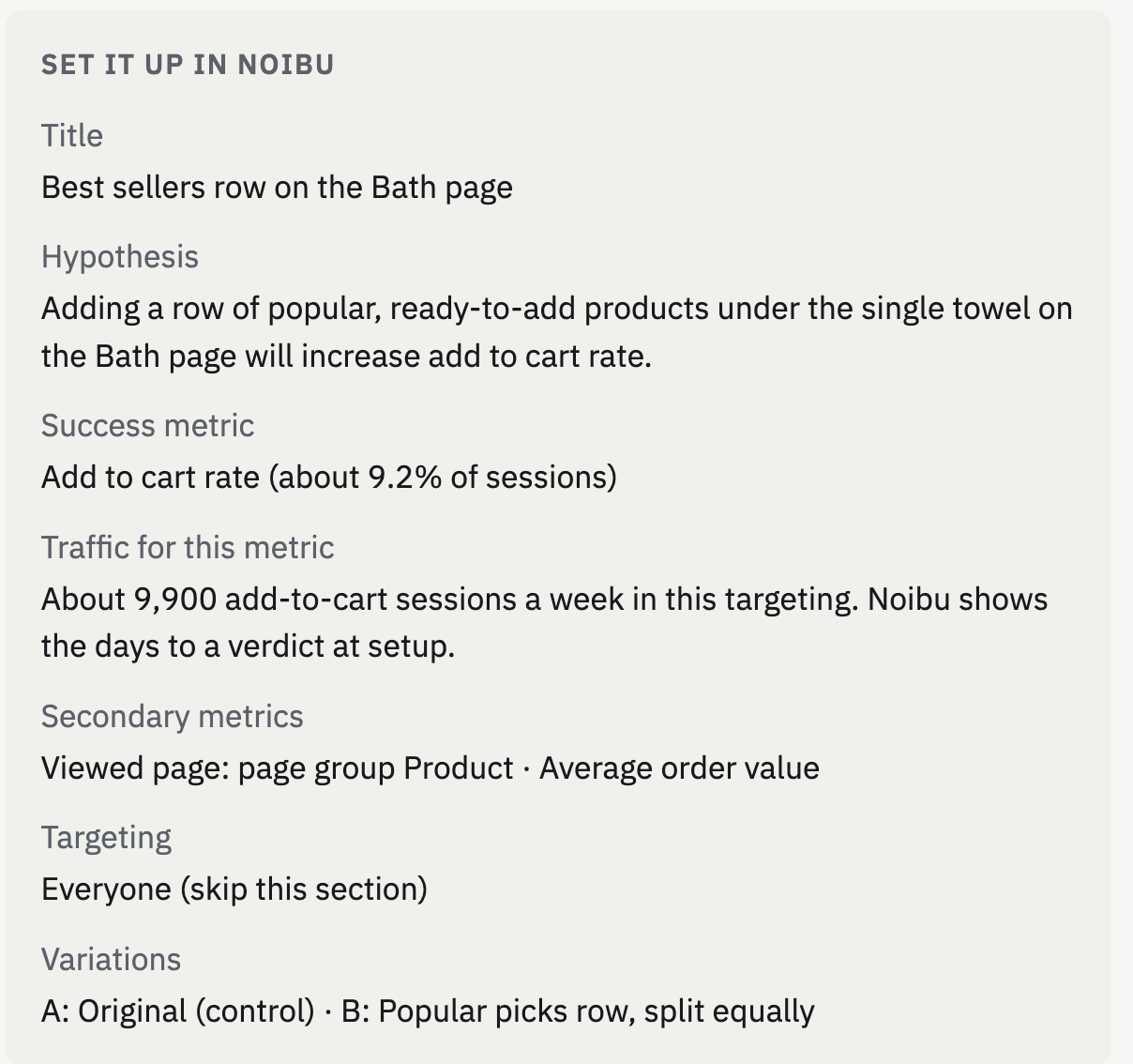
Traffic, how many sessions a week, within the test’s targeting, reach the event the success metric counts, such as adding to cart. Noibu shows the estimated days to a verdict when you create the test.
Overlap, when it applies: a Noibu test already running or drafted on the same page, or another testing tool found on it
Dev notes, the page and element to change for each variation, and what the variation shows instead
Fix first, when a Priority Issue sits inside the test’s page
Create A/B test in Noibu, the button that creates the test
The skill uses only settings the Create A/B test screen offers. It sets the success metric to Add to Cart Rate, Checkout Conversion Rate, or Viewed Page for a URL or page group, and can add Average Order Value as a secondary metric. Targeting is by UTM parameters, device type, and country. Where the skill measured a baseline, the success metric shows it. Otherwise it reads “baseline shown at setup”, and Noibu shows the current figure when you pick the metric.
In chat, you get a short summary alongside the page: the top-ranked test, which ideas the site check removed, and the cart disclosure when the cart was checked. The tests themselves are on the page.
Reading the previews
Each preview applies the variation’s visible change to your live page and captures it as a screenshot. It shows what shoppers would see, so your team can discuss the test before anyone builds it.
Note: The browser tab may be left open showing one variation on your live site, so you can look at it directly. The change exists only in that tab. The preview is an approximation. It is not the implementation and not exactly what the test will ship. Your developers build the variation in your site’s code, and the code they write is what shoppers see during the test.
Creating the tests in Noibu
Click Create A/B test in Noibu on any test to create it in your Noibu account as a draft, with the setup shown above the button. A draft serves no traffic and stays fully editable in Noibu, so you can review and adjust it there before anything goes live.
When a test is created, the button shows the test’s flag key, which your developers use in code. If a test with the same title already exists on your domain, the button reads Already in Noibu rather than creating a duplicate.
From there, the test follows the standard A/B testing flow: your developers implement each variation, you start the test, and you read the results. See Implementing an A/B test and Measuring A/B test results. This skill never creates a test on its own, and editing, starting, stopping, and deleting tests all happen in Noibu.