Session Replay overview
Last updated: November 16, 2026
Session Replay in Noibu shows you how shoppers experience your online store, from the moment they’re browsing to after their visit ends. You can watch in-progress sessions up to the minute, co-browse with a shopper in real time from their Help Code, or replay completed sessions including friction indicators and technical context.
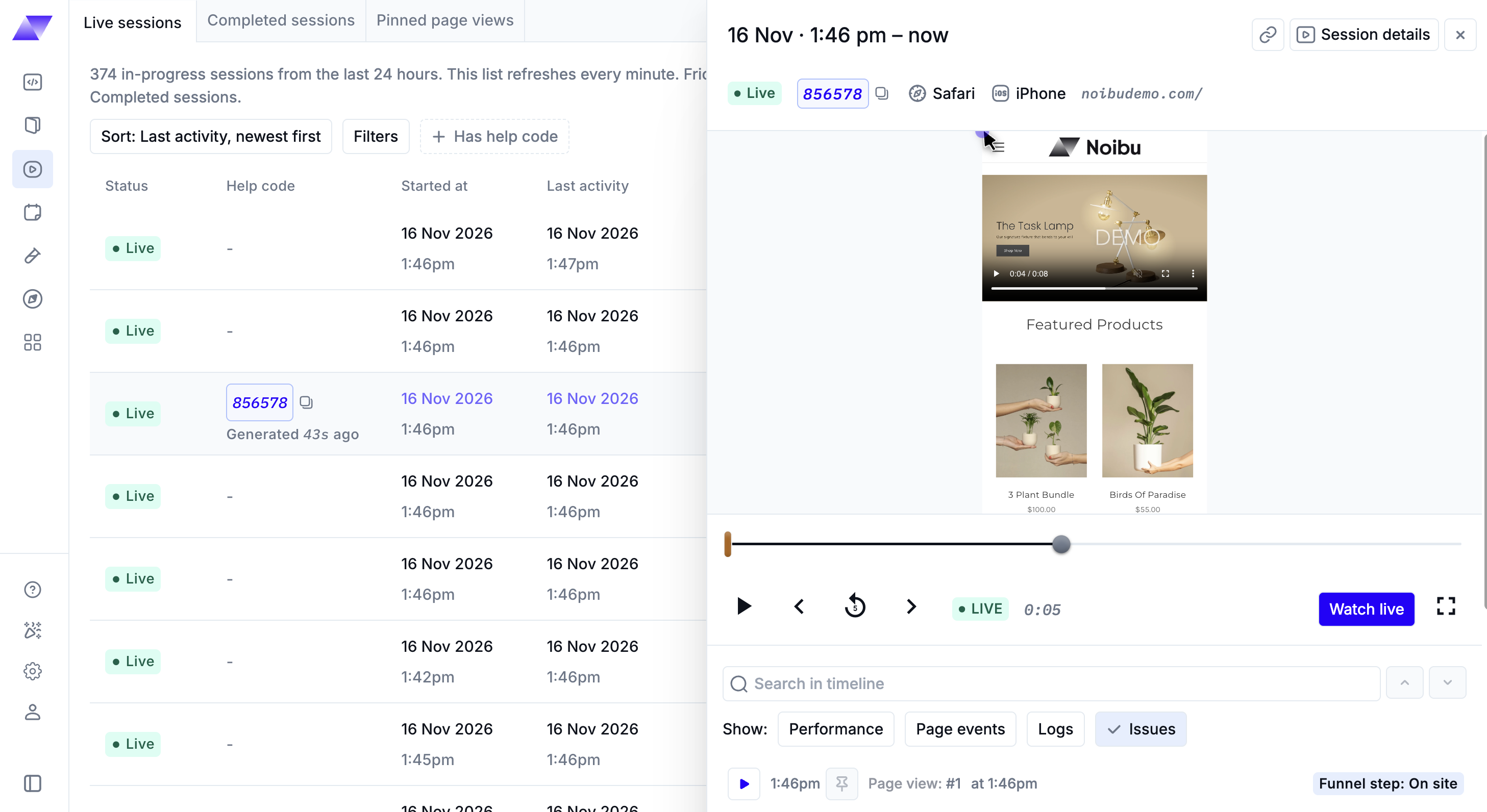
A session replay is a reconstruction of a shopper’s visit to your site, shown in a video-like format. Noibu builds it from event-level data captured during the visit, such as clicks, page views, and inputs. Because it’s a reconstruction rather than a pixel-by-pixel screen recording, Noibu masks sensitive data (personally identifiable information, or PII) while still showing user behaviour and technical context.
Three ways to view sessions
All three views are on the Session replays page in the left-hand navigation.
Live Sessions: up-to-the-minute playback
The Live sessions tab lists in-progress sessions from the past 24 hours and refreshes every minute. Each live session’s event timeline updates every minute with the shopper’s latest activity and linked issues, and you can watch every page visit up to the one the shopper is on now without waiting for the session to end.
Learn more about Live Sessions.
Help Code co-browsing: real-time support
Help Codes let a support agent watch a shopper’s session in real time with Noibu’s PII blocking in place. It shows the page a shopper is on right now with real-time cursor movements, and can show exactly what a shopper sees while you help them on chat or by phone.
Learn more about co-browsing with Help Codes.
Completed Sessions: on-demand replay
The Completed sessions tab lists sessions that have ended and been processed for on-demand playback. Completed sessions include friction factor, session symptoms, error count, and the full session timeline, which makes them the starting point for most investigations.
Learn more about Completed Sessions.
Note: Every live session moves to Completed sessions once it ends and finishes processing. The same Help Code finds the session in both places, so a support ticket that starts with co-browsing can be escalated with the full completed session.
Working with sessions
The following articles cover the tools you’ll use once you’ve found a session.
Filtering and sorting sessions: narrow the Live sessions or Completed sessions table to the sessions you need.
Session Playback: use the session player and timeline to follow a shopper’s journey and linked issues.
Session Details: review session metadata, pinned page visits, and other sessions from the same browser.
Session Symptoms: understand the frustration signals Noibu tags on completed sessions.
Pinning a Session: save a page visit so it’s kept for later review.
Custom Attributes: find completed sessions by your own identifiers, such as customer ID or order ID.
Finding a shopper’s session with a Help Code
A Help Code is a six-digit code a shopper generates to identify their session. It connects all three views: use it to co-browse while the shopper is on your site, find their session on the Live sessions tab, or filter Completed sessions after the session ends.