Mobile monitoring overview
Last updated: September 9, 2026
With mobile apps often outperforming desktop and mobile web in terms of conversion rates, being able to see how users interact with your app is essential for uncovering and addressing issues that could obstruct the purchase journey. Noibu offers error detection, alerting, and session replay capabilities to help engineering and product teams discover and resolve user-impacting errors.
To implement Noibu’s monitoring solution on your mobile app, you’ll need to implement our mobile SDK. At this time, Noibu supports the following mobile app frameworks:
iOS | Android | |
React Native | ✔ | ✔ |
Cordova | ✔ | ✔ |
Native | ✔ | ✔ |
Flutter | Available in beta | Available in beta |
Key Mobile Monitoring Capabilities
Error Detection
Issues Table
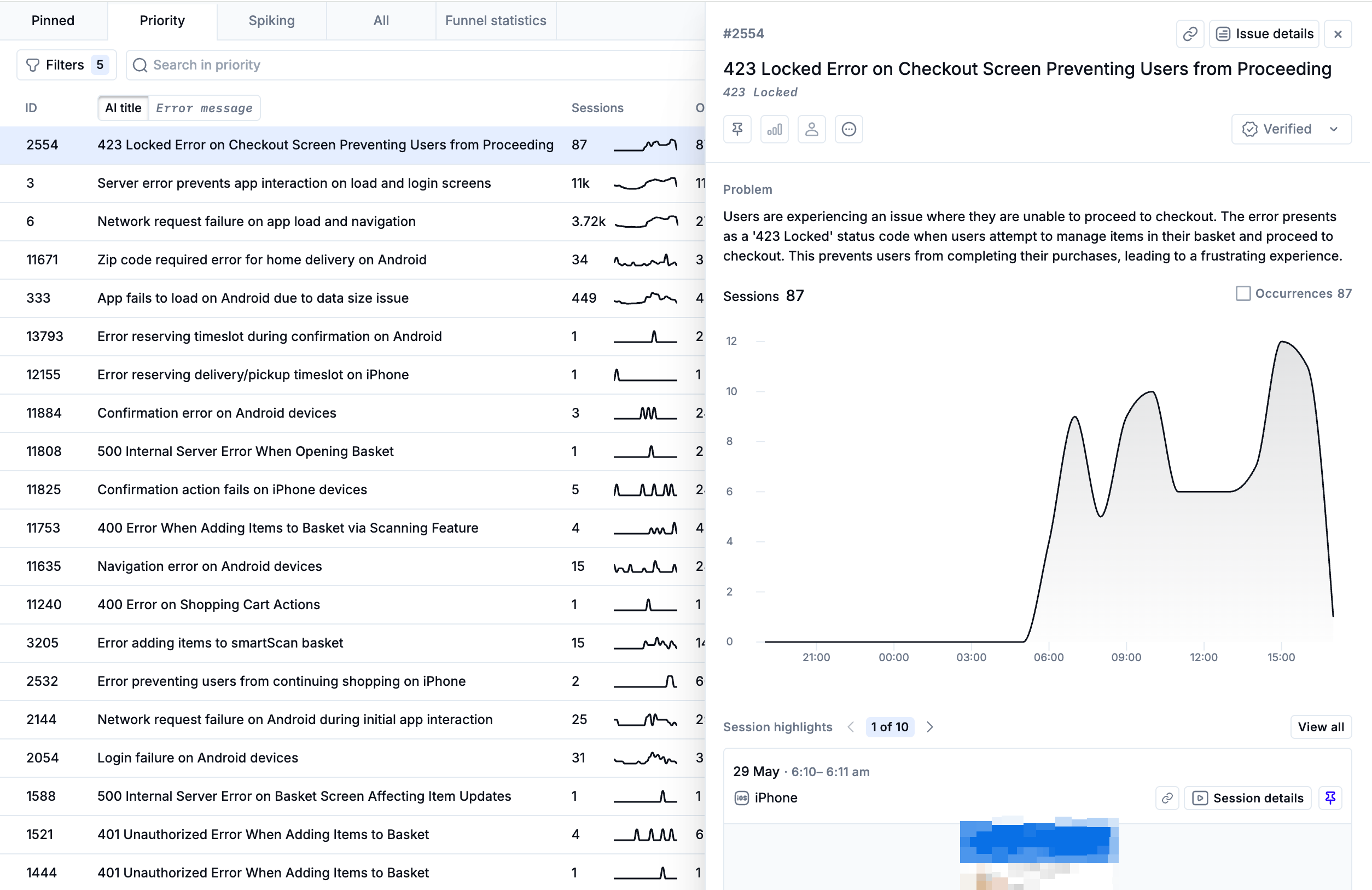
Noibu's lightweight SDK operates in the background of your mobile app, continuously monitoring for front-end issues. The Issues page helps teams easily identify and manage problems that affect user experience and revenue. It is segmented into four key views:
Pinned Issues: Displays issues manually triaged as user-impacting. It allows you to quickly revisit known issues that require ongoing attention.
Priority Issues: Often the first starting point to investigate and triage errors on your website, this tab surfaces the most critical issues that are actionable.
Spiking Issues: Highlights issues that have shown a significant increase in frequency, helping detect regressions or problems introduced by recent updates.
All Issues: A complete chronological log of all detected errors, offering a comprehensive list for broader reviews and retrospective analysis.
Each view includes filter options that allow you to drill down to specific error types, user flows, or platform conditions. Learn more about filtering the issues table (note that not all filter criteria are available in the mobile context).
Investigating Issues
Clicking any issue in the table opens a side panel that displays a summary of the issue’s frequency, user impact, and associated session data. This allows for a quick initial assessment without navigating away from the main view. If more context is required, clicking the Issue Details button will bring up a full, in-depth view.
Issue Details
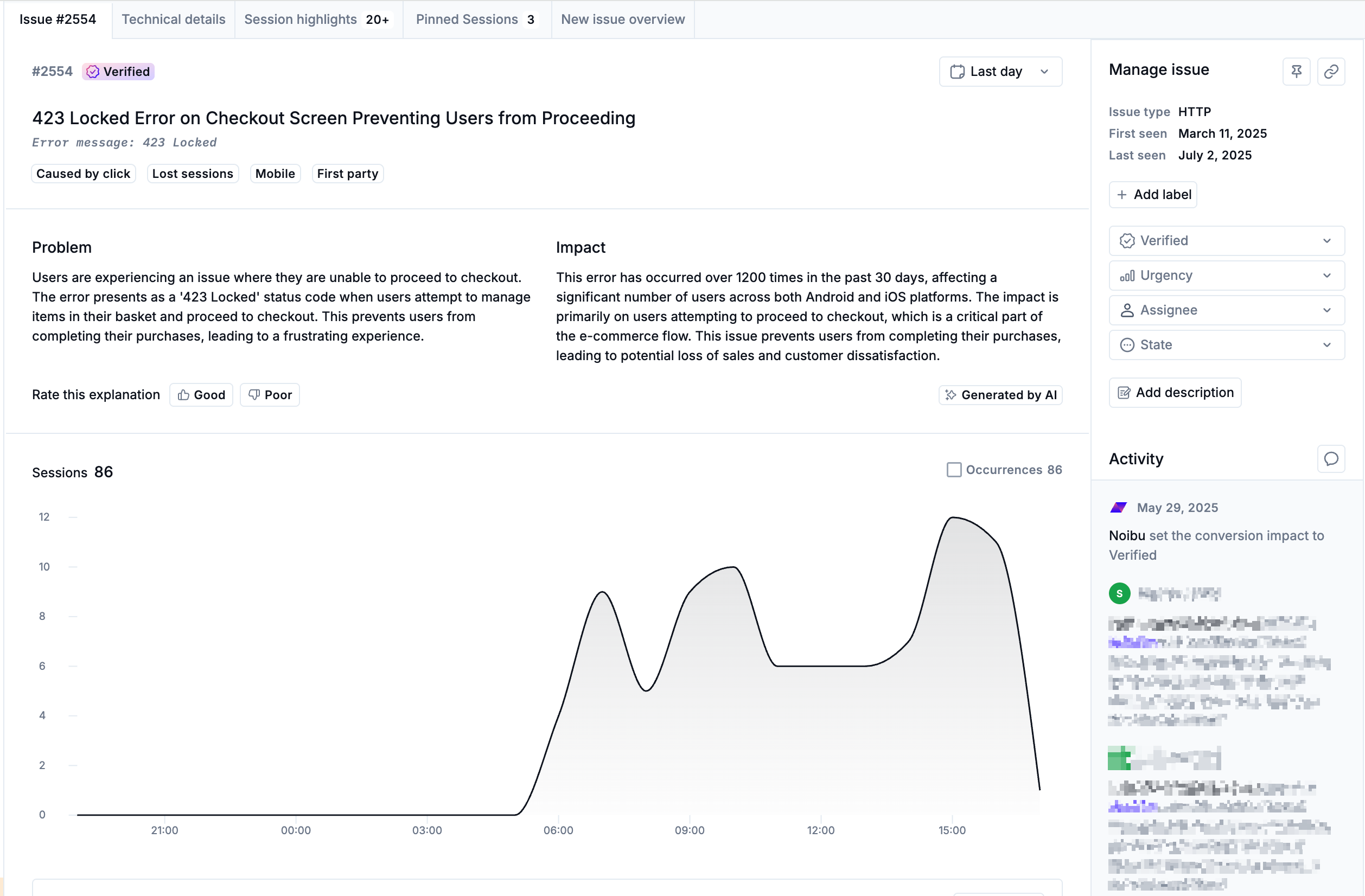
You can dive into the details of any individual issue to better understand the nature of the problem.
Issue Title and Description: An AI-generated title that concisely describes the error, along with a technical message and an estimate of its potential impact on users.
Insights: Recurring triggers or patterns related to the issue. Hovering over an insight will show a tooltip with its definition.
Sessions & Occurrences Chart: Visualizes number of impacted sessions and the number of occurrences over time. When release monitoring is configured, a icon marks release events on the chart, allowing you to correlate issue frequency with a specific app update.
Session Highlights: Offers session snippets showing how users encountered the issue. Pinned sessions are shown at the top. Each session can be opened for detailed playback.
Top Symptoms: Aggregates behavioral indicators (e.g., Rage Clicks, Form Desertions) tied to the issue. It compares the occurrence rate of these symptoms in affected sessions to their occurrence in unaffected sessions, helping to contextualize user frustration.
Technical Details Tab
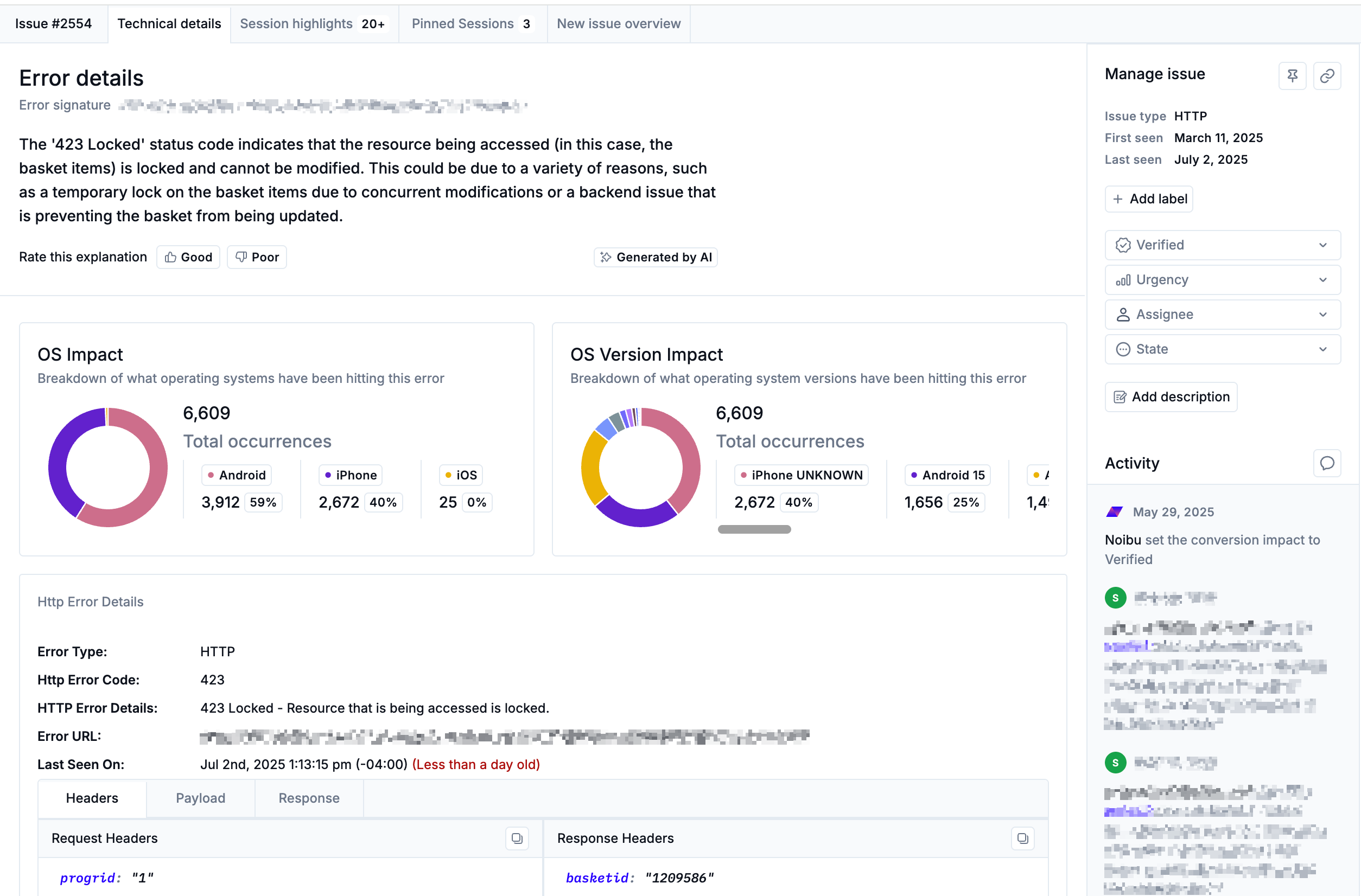
The Technical Details tab offers deeper diagnostics to help engineers reproduce and fix issues quickly. It includes the following sections:
Error Details: Displays the error message and signature, along with an AI-generated analysis.
OS Breakdown: helps identify whether an issue disproportionately affects a particular operating system or version. This information is key when setting up emulators or test environments to reproduce platform-specific bugs.
Stacktrace: Offers a detailed trace to pinpoint the exact location of the issue in the codebase. Learn more about stack traces.
Prioritizing Issues for Action
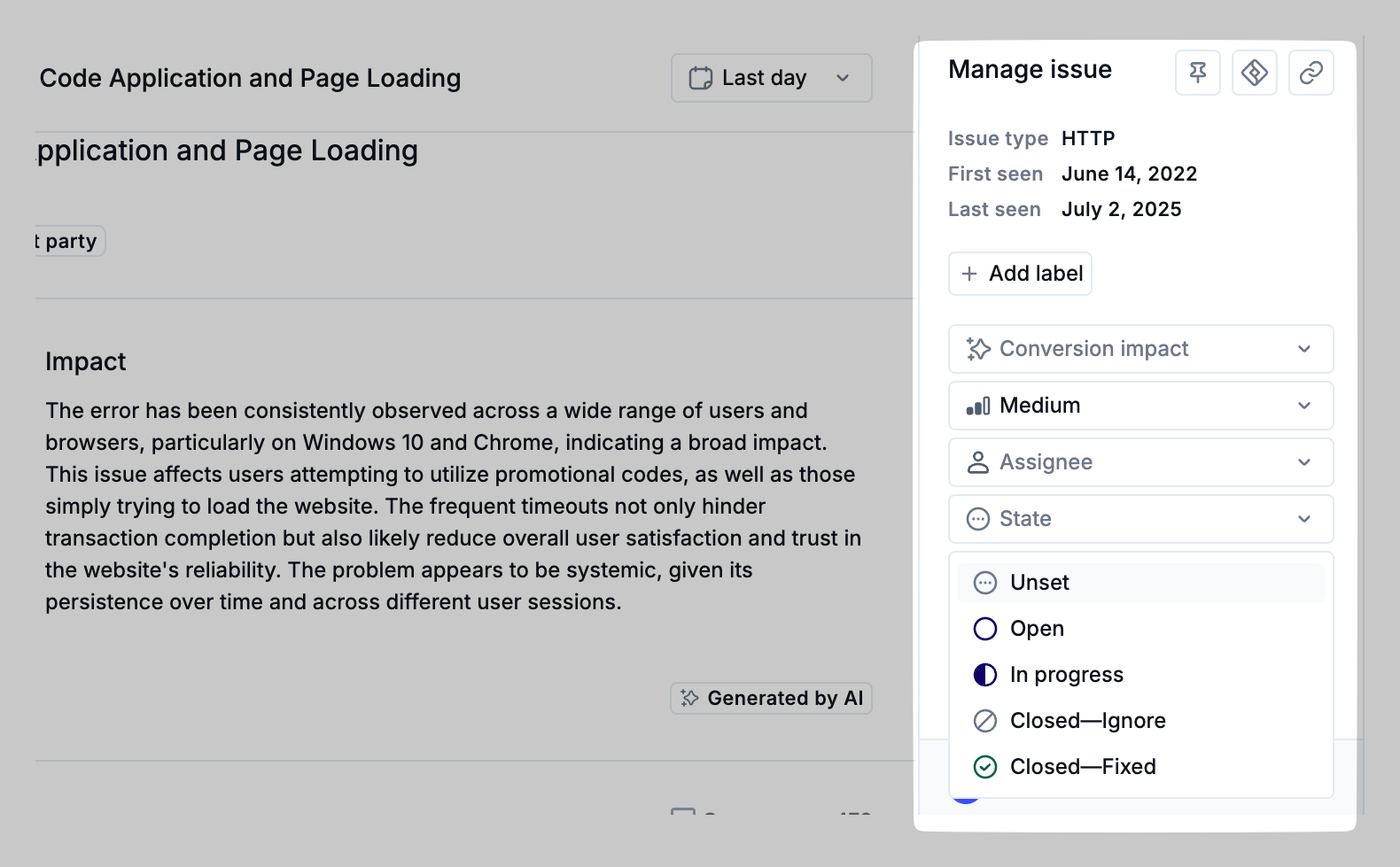
The Manage Issue panel on both the Issue Overview and Technical Details tabs makes it easy to triage and manage issues once they’ve been investigated.
Pinning an Issue: Pinning makes it easy to keep track of high-impact issues and ensures they appear in the Pinned Issues tab for continued visibility.
Syncing to Jira: creates a Jira ticket for the issue to ensure the engineering team has the information needed to resolve an issue efficiently. Learn more about Jira integration.
Sharing a Link: generates a URL to share the issue externally. This includes a summary of the error, a stack trace, and any pinned sessions to help third parties investigate and resolve the issue.
Labels, Urgency, Assignee, Status: Use these fields to assign ownership and track the issue’s lifecycle. Learn more about issue management.
Proactive Alerts
Noibu allows teams to set alerts that notify stakeholders of new or escalating issues within the app. You can configure custom conditions that trigger notifications to email or Slack when conversion-blocking bugs emerge in your mobile app. This ensures teams can take timely action to investigate and fix them before they impact broader user segments.
Learn more about alerts (note that not all alert conditions are available in the mobile context).
Session Replay
Sessions Table
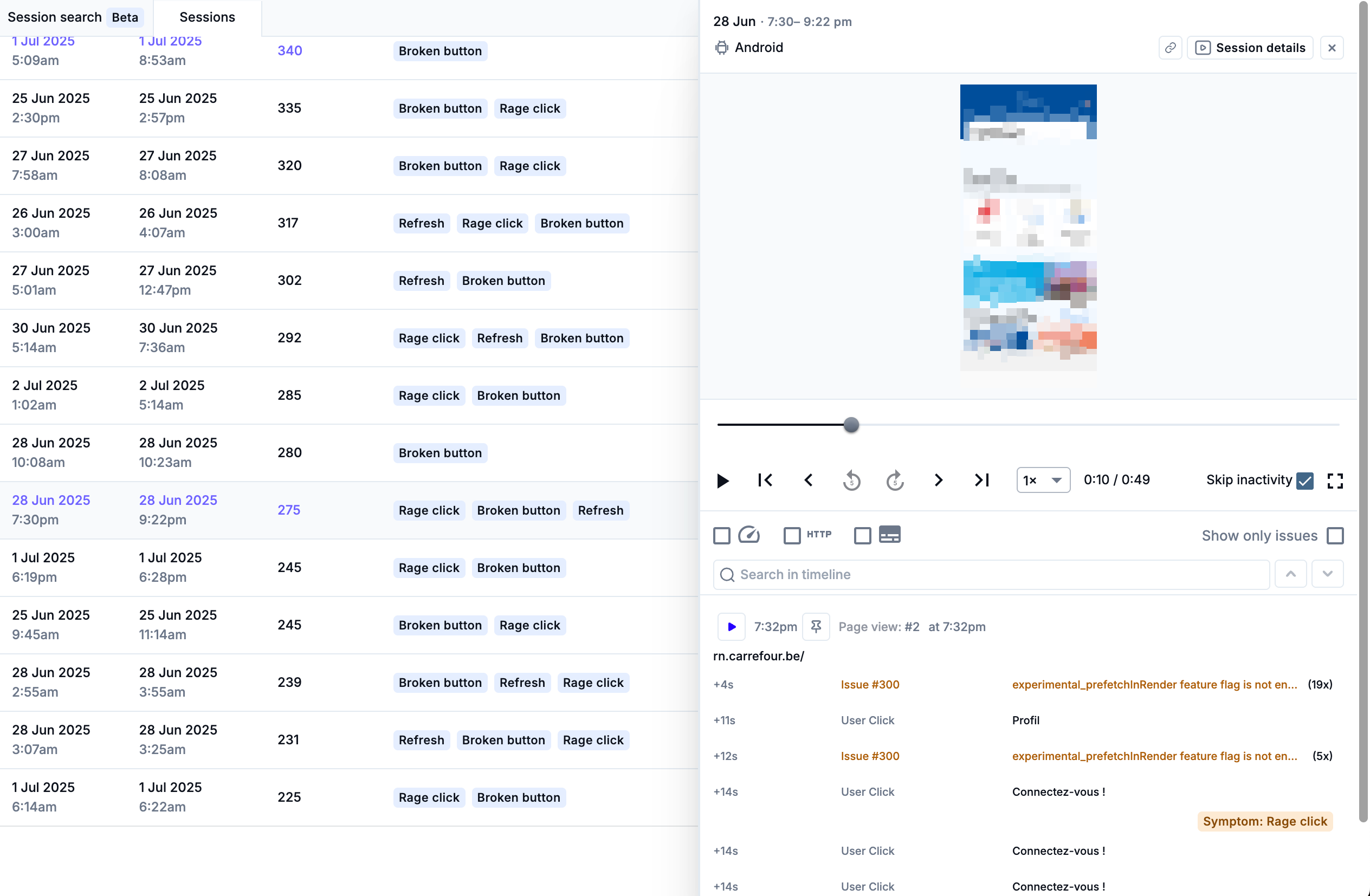
The Sessions table logs each individual user session in your mobile app. This interface includes filtering options to help you locate specific sessions or identify patterns of user behavior. Not all filter types from the web context are available for mobile apps. Learn more about filtering the Sessions table (note that not all alert conditions are available in mobile contexts).
Session Playback
Clicking a session opens a replay interface with playback controls. You can pause, skip, or jump between key moments. This is a critical tool for understanding how and where users encounter issues. Clicking the Session Details button will open the session in a larger view, with additional tabs that provide more detail about the user session. Learn more about session playback (note that some web-only playback features, such as Web Vitals and Page Lifecycle events, are not supported for mobile sessions.)
Pinning Sessions
Pinning a session flags it as an important example of an issue’s impact on customers. This action ensures that the session is retained indefinitely and provides a convenient way to share context with developers or stakeholders. You’ll be prompted to associate it with a specific issue and describe its significance. Learn more about pinning sessions.